

Shopping Cart Help 
Shopping Cart System
- About Online Ordering/Shopping Cart
- Product Shipping Rates and Policies
- Photocopying Fees and Policies
- Placing Your Order
- Tracking Orders
- Canceling Orders
- FAQs
About the Shopping Cart/Online Ordering
The NCJRS Shopping Cart system allows customers to order available products and photocopy services online. NCJRS Abstracts Database Items with an Order link are available in our stock of product inventory to be ordered. NCJRS has copyright permission to reproduce items with the Order Photocopy link, which are not available in our stock of product inventory.
To identify if an item is available to order, conduct a search for the item using the NCJRS Virtual Library/Abstracts Database Search page. From the individual abstract detail page(s), if the item can be ordered, select the available order link to add it to your shopping cart. You can then continue browsing or place your order.
Product Shipping Rates and Policies
Product shipping and handling rates are based on the quantity of products being ordered and your location. Rates are calculated separately from photocopy service fees. The chart below details shipping and handling rates for products.
| Product Shipping and Handling Rates | ||
| Quantity | Domestic | Outside U.S. |
| 1-2 | $5.00 | $26.25 |
| 3-5 | $7.50 | $30.00 |
| 6-10 | $9.00 | $35.50 |
| 11-15 | $9.25 | $39.25 |
| 16-20 | $9.50 | $46.50 |
| 21-25 | $9.75 | $49.00 |
| 26-50 | $10.25 | $60.75 |
| 51-75 | $13.00 | $75.50 |
| 76-100 | $16.00 | $91.50 |
| 101-200 | $23.25 | $129.50 |
| 201-300 | $43.75 | $189.75 |
| 301-400 | $59.00 | $253.25 |
| 401-500 | $75.00 | $349.00 |
- Orders which require payment are shipped priority mail and are traceable. Login to your account to track your order.
- Shipping and handling charges are automatically applied when items are added to the cart or when the shopping cart is updated.
- Some items may be exempt from shipping and handling. Exemptions are automatically applied when the item is added to the shopping cart and are not calculated in the shipping and handling quantity range.
- Products may be shipped separately depending on the stock status. The types of stock status are:
- Backordered: Quantities for this item are currently unavailable. This item will be backordered and will ship when it becomes available. You will be notified by email when the backordered item is shipped.
- Low in Stock: Due to limited inventory, part of your requested quantity for this item may be backordered. If the item is backordered, you will be notified by email when it is shipped.
- In Stock: Your requested quantity is fully available for this item.
Photocopying Fees and Policies
Photocopying fees are calculated based on the number of pages of the original document (page count) and your location (domestic or outside U.S). The chart below details photocopy service fees.
| Photocopy Services Fees | ||
| Quantity | Domestic | Foreign |
| < 25 pages | $5.00 | $6.50 |
| 25 - 49 pages | $10.00 | $11.50 |
| 50 - 100 pages | $20.00 | $22.50 |
| 101 - 400 pages | $40.00 | $45.00 |
| > 400 pages | $60.00 | $67.50 |
- Orders which require payment are shipped priority mail and are traceable. Login to your account to track your order.
- Due to copyright restrictions, more than one copy of the same title cannot be ordered for photocopying.
- The page count is the number of pages of the original document. Page counts on photocopy services may include blank pages as they appear in the original document. Photocopy service fees are calculated based on the page count of the original document.
- Shipping and handling charges are included in the photocopy fee. Additional shipping and handling fees are not applied to photocopy orders unless the order also includes products.
- Customers will not be billed until the availability of the requested document is confirmed.
Placing Your Order
Use the following tips for placing your order.
Ordering Products
While browsing the NCJRS Virtual Library/Abstracts Database via the OJP website, you may order any publication or product that has an Order link. Simply click on the Order link that appears on an abstract detail page to add the item to your cart. From the shopping cart you may continue to browse the site or proceed to checkout.
Ordering Photocopy Services
You may also see the Order Photocopy link associated with some of the materials you find on the OJP site. This means that the document is not available in original hard copy, but we may produce a black and white copy of the original for you. To order a copy, click on the Order Photocopy link to add the title to your shopping cart. From the shopping cart you may continue to browse the site or proceed to checkout.
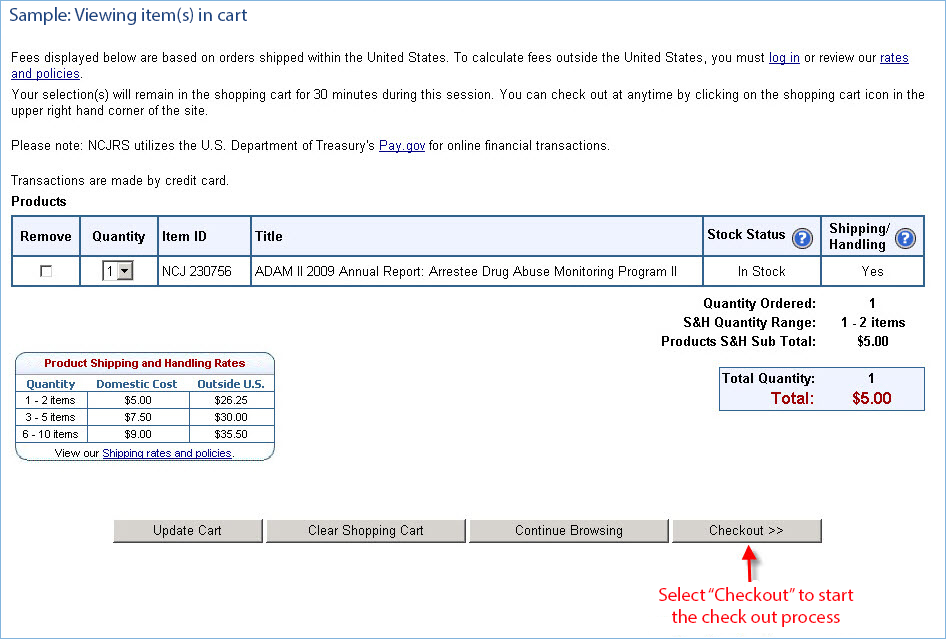
After selecting an item from the website the selected item will appear in your shopping cart.
Updating Quantities
If multiple quantities may be ordered, select the quantity of your choice from the dropdown menu.
Then click on the Update Cart button. A maximum of 500 items may be ordered in one online order.
Logging In
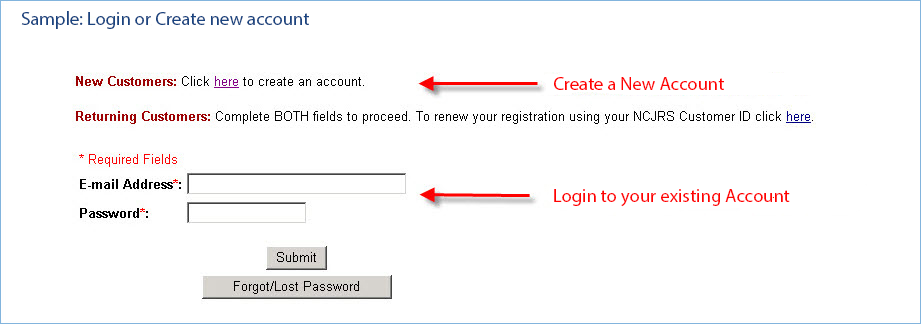
Login to your account or create a new account in order to obtain your shipping and handling rates or photocopy fees and finish your order.
Forms of Payment
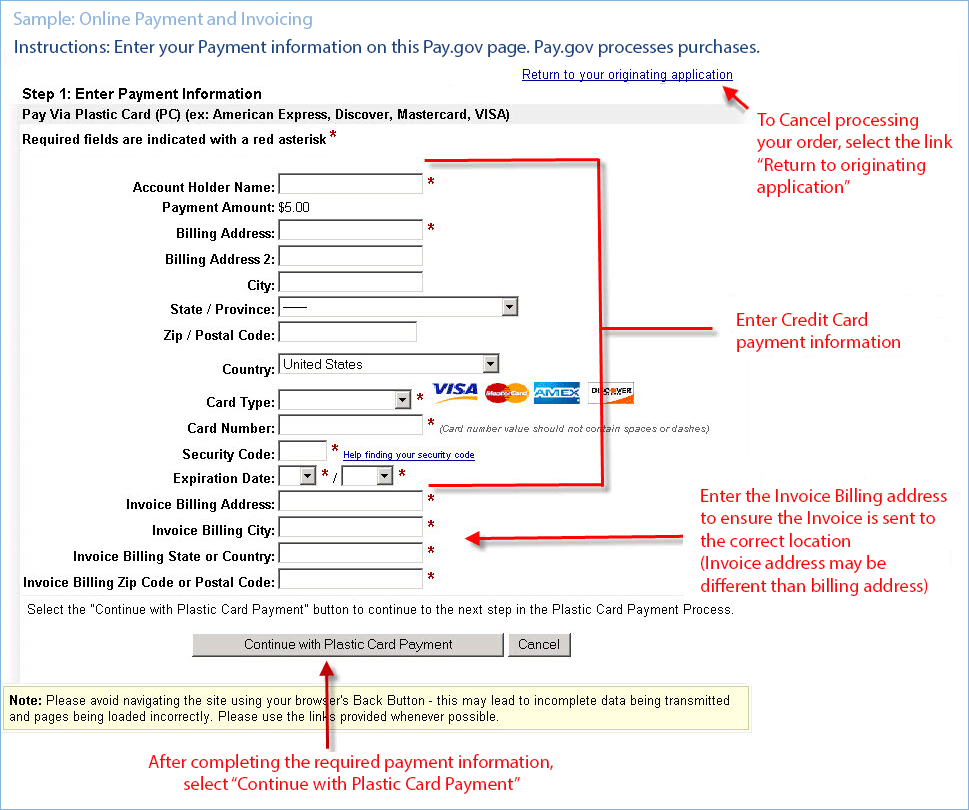
Pre-payment is required for all orders. Visa, MasterCard, American Express, and Discover are accepted for online orders through Pay.gov.
Checking Out
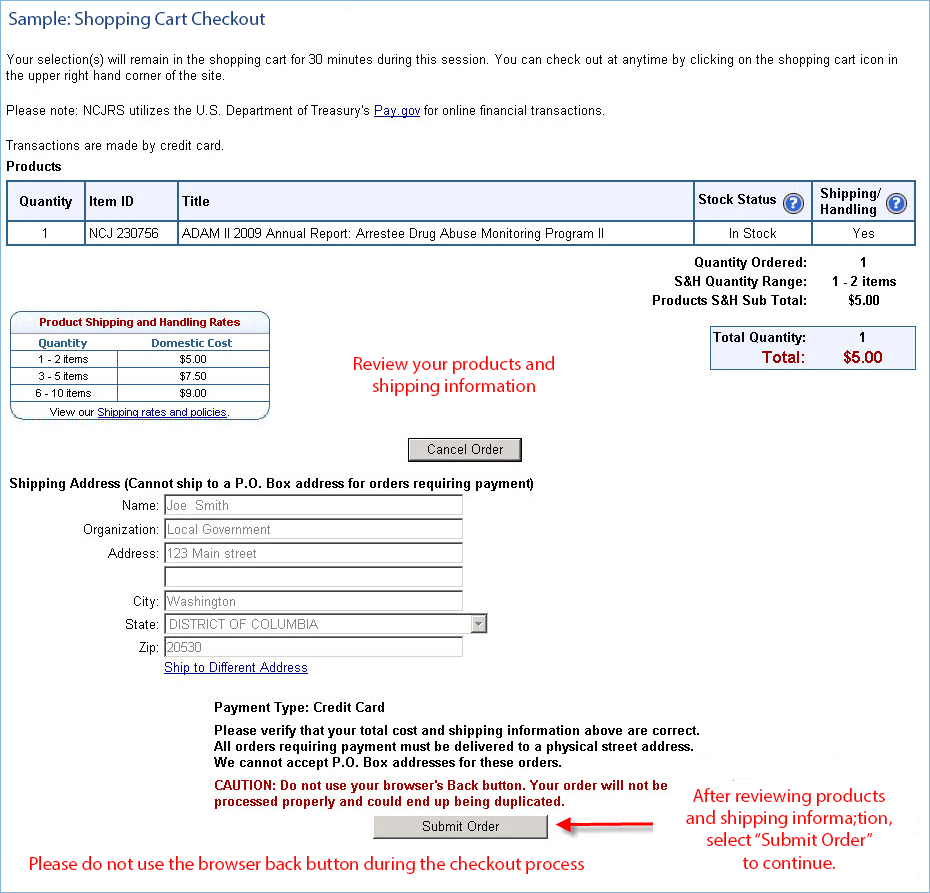
Be sure to perform the following steps to submit your order:
- Confirm the products or services ordered.
- Verify the accuracy of your billing and shipping addresses.
- Provide accurate payment information to Pay.gov.
- Submit your order.
- Print out your order confirmation for your records.
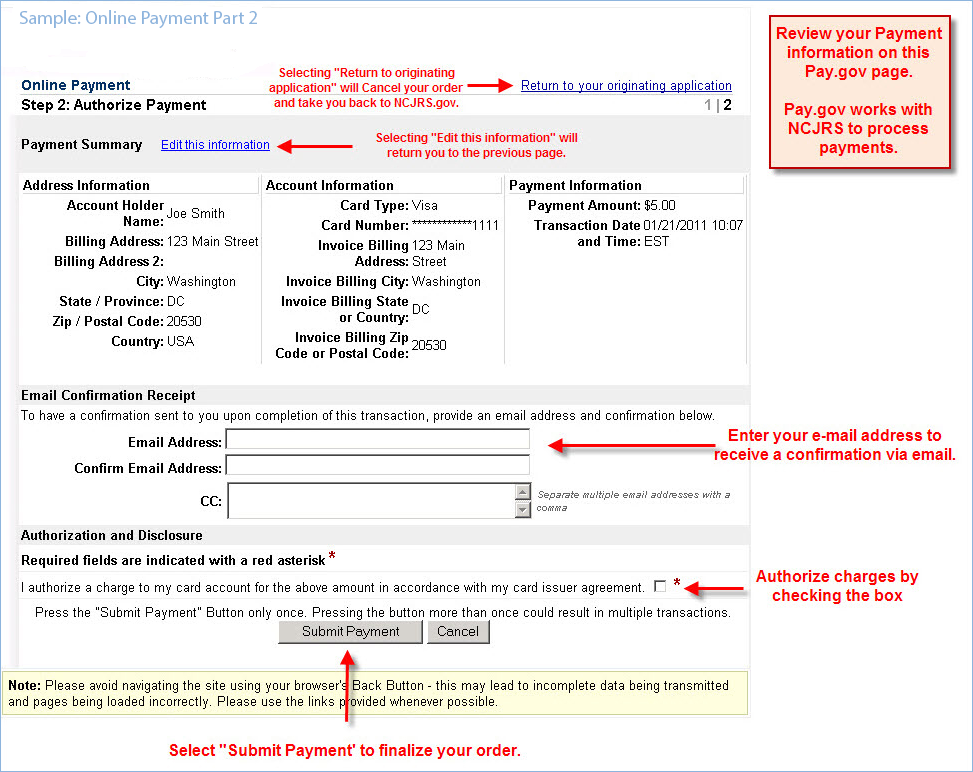
The Payment information page of checkout is hosted on Pay.Gov.
On the Payment Summary and Authorization page, review payment information and enter an email address to receive a confirmation.
Users should authorize charges and submit.
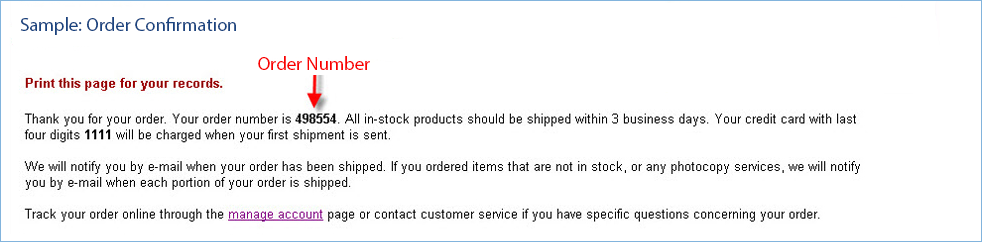
On the Order Confirmation page, your order number is provided.
When You Will Be Charged
Your credit card will be charged when the first part of your order is shipped.
Tracking Orders
If the ordered items are in stock, your order will be shipped from our fulfillment center within 3 business days. For orders within the United States, please allow 5 to 7 additional business days for delivery. If the ordered items are not in stock, your order will be shipped from our fulfillment center when the items are received into our inventory. You may view your order status through the Manage Account page.
Check the status of your order online through the manage account page.
Orders which require payment are shipped via a priority, traceable method. Login to your account to track your order.
Contact customer service if you have specific questions concerning your order:
- Contact us.
- Call us: 800-851-3420.
Canceling Orders
Before your Order is Submitted
You may cancel your order by selecting the "cancel order" button on the checkout screen.
After Your Order Has Been Submitted
You may cancel your order if the order has not been shipped. To determine whether your order has been shipped, Login to your account and click View your order status.
If your order has not been shipped, contact us to confirm the status and cancel your order.
FAQs
Below is a list of frequently asked questions for using the NCJRS Shopping Cart system.
Ordering and Ordering Assistance
How many photocopies of a publication may I order?
Due to the terms of our copyright release agreements, only one photocopy of a publication may be ordered.
What are the photocopy fees?
Learn more about photocopy fees in the Photocopying Fees and Policies section.
Why is my cart empty even though I added items?
The system uses non-persistent cookies, or session variables, to save the items in your shopping cart while you do additional shopping. These session variables expire if the system is idle for 30 minutes, or when you close your browser. Also, your browser must have “Accept Cookies” enabled for these session variables to work. To determine if you have cookies enabled, use the “Help” function on your browser's toolbar and search for “cookies.”
Why must I use a street address for my order?
All orders requiring payment must be delivered to a physical street address in order to track your shipment. Therefore, we cannot accept P.O. Box addresses for these orders. If a physical street address is not available please contact us for assistance.
How will I know my credit card transaction is secure?
NCJRS utilizes the U.S. Department of Treasury's Pay.gov for payment processing. See the Frequently Asked Questions section of the Pay.gov site to learn more.
How can I expedite an order?
If you need an item to be shipped earlier than the 3 business days cited above, contact us.
How will I know if my order has been successfully submitted?
When your order is submitted, the system will display a confirmation screen with your order number.
Can I cancel my order?
You may cancel your order if the order has not been shipped. To determine whether your order has been shipped, Login to your account and click View your order status.
Shipping Related FAQs
What are the shipping and handling fees?
View the Product Shipping Rates and Policies section.
How will I know when my order has been shipped?
You may track the status of your order through the Login/Manage Account pages of this site.
How long will it take to receive my online order?
If the ordered items are in stock, your order will be shipped from our fulfillment center within 3 business days. For orders within the United States, please allow 5 to 7 additional business days for delivery. If the ordered items are not in stock, your order will be shipped from our fulfillment center when the items are received into our inventory. You may view your order status through the Manage Account page.
Payment FAQs
What payment types are accepted?
Visa, MasterCard, American Express, and Discover are accepted for online orders through Pay.gov.
How do I know my credit card transaction is secure?
NCJRS utilizes the U.S. Department of Treasury's Pay.gov for payment processing. See the Frequently Asked Questions section of the Pay.gov site to learn more.
When will my credit card be charged?
Your credit card will be charged when the first part of your order is shipped.
Viewing and Downloading Items
Are any of the items available to download for free?
Many publications are available to download for free. If an item is available to download, links to the available file formats will be available on the publications/products listing. Items may be available in PDF, ASCII text, HTML, or Document format, and all formats may be downloaded or printed.
How can I view PDF files?
PDF files must be viewed with an Adobe Acrobat Reader. If you do not have a copy, it can be downloaded for free from the Adobe website.